
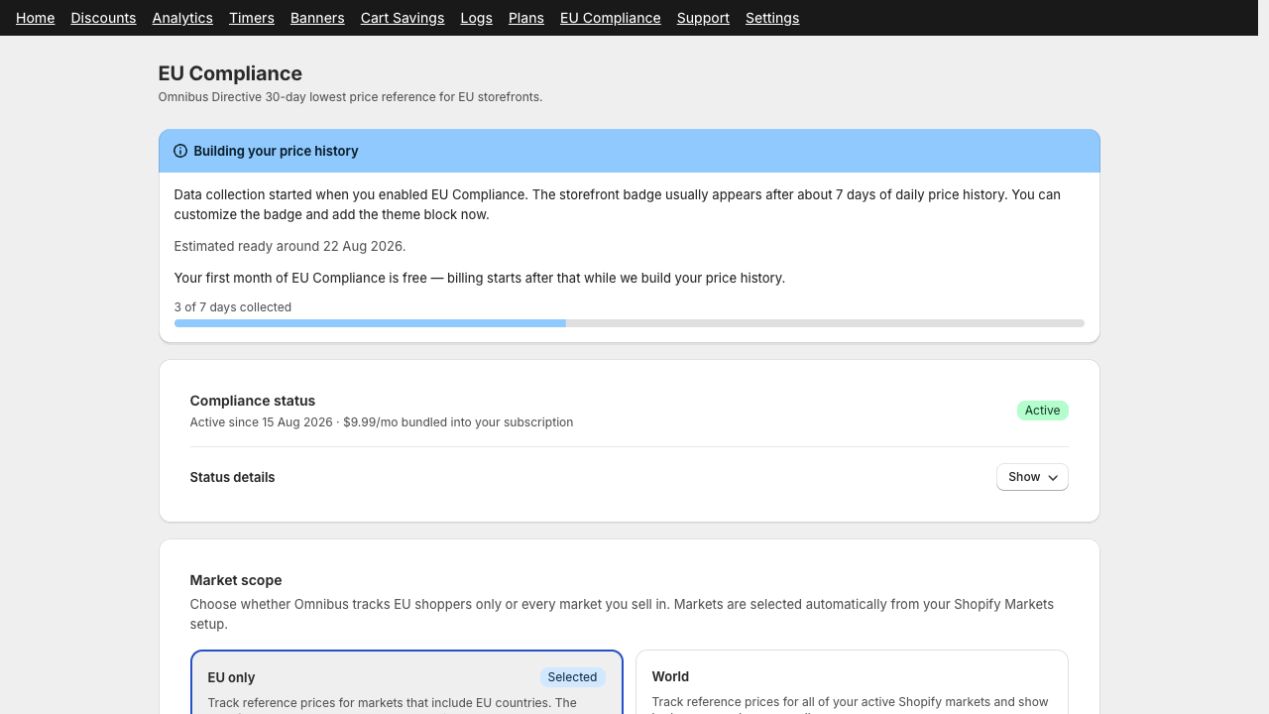
EU Compliance status
The EU Compliance page shows activation status, price-history progress, and the estimated date when the badge can become eligible.
The EU Omnibus Compliance add-on helps merchants display a reference price when announcing a product price reduction. GetSale tracks each variant’s contextual price by Shopify Market and presentment currency, then displays the lowest recorded price from the period before the current offer.
Important: GetSale provides tools to support your compliance workflow, but this guide is not legal advice. Requirements can vary by country and business. Consult a qualified adviser if you are unsure which rules apply to your store.
What the add-on does
Captures contextual variant prices for each enabled Shopify Market approximately every six hours.
Stores one minimum price for each calendar day, market, and currency.
Calculates the lowest recorded price in the trailing 30-day window before the current reduction.
Works with discounts created by GetSale, Shopify admin, or another app when the variant’s compare-at price is higher than its current price.
Writes the reference price to a protected GetSale metafield and displays it through the Omnibus reference price theme block.
When the storefront badge appears
The badge is displayed only when all of the following are true:
The EU Omnibus Compliance add-on is active.
GetSale has permission to read Shopify Markets.
The shopper’s country and presentment currency match an enabled market reference.
At least seven distinct days of price history have been collected for that market.
The selected variant is currently discounted: its compare-at price is higher than its current price.
The current price is at or below the stored reference price.
The Omnibus reference price block is added to the product template.
Show Omnibus badge on storefront is enabled in GetSale.
History starts when you enable the add-on. The badge usually becomes eligible after about seven days, then uses up to 30 days of available history. The {days} value in your label reflects the available history period.
Supported price reductions
The feature is not limited to GetSale campaigns. It can display a reference price for any product or variant sale that uses Shopify’s price and compare-at price fields.
Cart-level and order-level discount codes do not change the product’s compare-at price, so they do not trigger the Omnibus badge.
Collection limits
Price changes between the six-hour snapshots may not be recorded until the next snapshot.
Newly enabled stores do not have historical data from before activation.
The badge stays hidden when GetSale cannot match the shopper’s market or currency to an eligible reference.